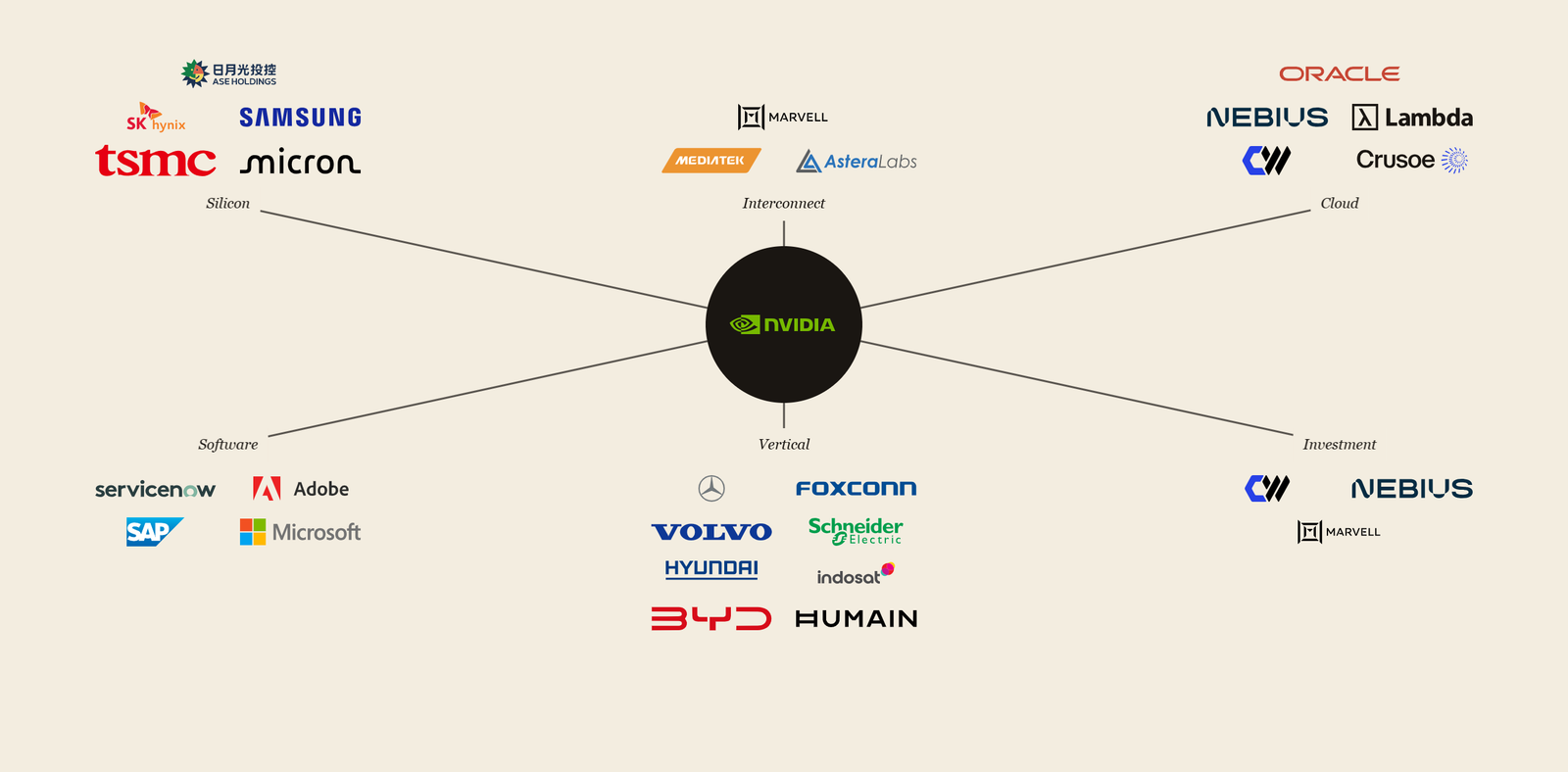
Why this exists
I wanted to understand NVIDIA’s ecosystem better. NVIDIA has a profound impact on the financial success of the businesses it partners with, and, as an investor, having that map in one place is useful context.
Existing trackers either flatten everything to logos on a slide or bury the interesting parts in long press releases. I wanted something in between: visual, scannable, but with the why of each partnership a click away.
What it does
Three views over one dataset:
- Graph: NVIDIA at center, six cluster labels (silicon / interconnect / cloud / software / vertical / investment), all 28 active partners arranged around their cluster. Hover any partner: a card with purpose, significance tier (core / significant / ancillary), and the latest 1–2 milestones in the partnership.
- List: every partner as a row, sorted by their most recent milestone date. Most-active partnerships float to the top.
- Detail page: a 1–2 sentence narrative on what the partnership means for that company’s economics, plus a full chronological timeline of every milestone since the partnership began.
How it works
The data flow is intentionally simple; most of the intelligence happens at maintenance time, not at request time.
- Collect: A daily GitHub Action scrapes the NVIDIA newsroom and a list of relevant RSS feeds, dedupes against existing articles by URL hash, and commits new ones to the repo
- Extract: Periodically, I open Claude Code and run
/extract. Claude reads new articles, classifies each as REJECT / UPDATE / PROPOSE NEW, and either appends a milestone to an existing partner or stages a proposal for a new one - Review significance: A second command,
/review-significance, refreshes the tier and narrative for any partner whose milestone list has grown since the last review - Render: Astro builds a static site from the JSON data file, deployed to Cloudflare Workers. Everything visible is generated at build time
The choice that mattered: keeping the runtime deterministic. Claude doesn’t run when a visitor loads the site. Claude only runs during maintenance, on data I review before it lands.
What’s next
- Forward-looking analysis, not just retrospective. Right now the significance narrative explains what each partnership is; the next layer is what it means for the partner’s trajectory: concentration risks, optionality the deal opens up, scenarios where it falls apart
- Make it more useful from an investor seat. Less “who is NVIDIA in business with” and more “what does this mean for the next twelve months of each partner’s earnings”
What I learned
- Parallel agents only work if you plan for them. When tasks split cleanly into independent work (UI components, isolated commands), dispatching subagents in parallel collapses hours into minutes. The trick is designing the plan so the parallelizable bits are obvious before you start, not improvised mid-execution.
- Settle the data model before the UI. I committed to the schema (milestones, significance tier and narrative) before mocking the hover card. Every UI decision after that was constrained and easy. The visual iterations on this project were all style tweaks; never structural rework, because the structure was right from the start.
Status
Shipped. Running. Two slash commands keep it current; everything else is automated.